FormulaSurge
All articles

Article

Excel Bank Reconciliation

How to do a bank reconciliation in Excel - load the bank statement and ledger with Power Query, match them with XLOOKUP, list the unmatched lines with FILTER, and prove the balance in one OK/REVIEW cell.

  • bank reconciliation
  • reconcile bank statement
  • accounting firms
  • xlookup
  • power query
3 min readBy
Excel Bank Reconciliation

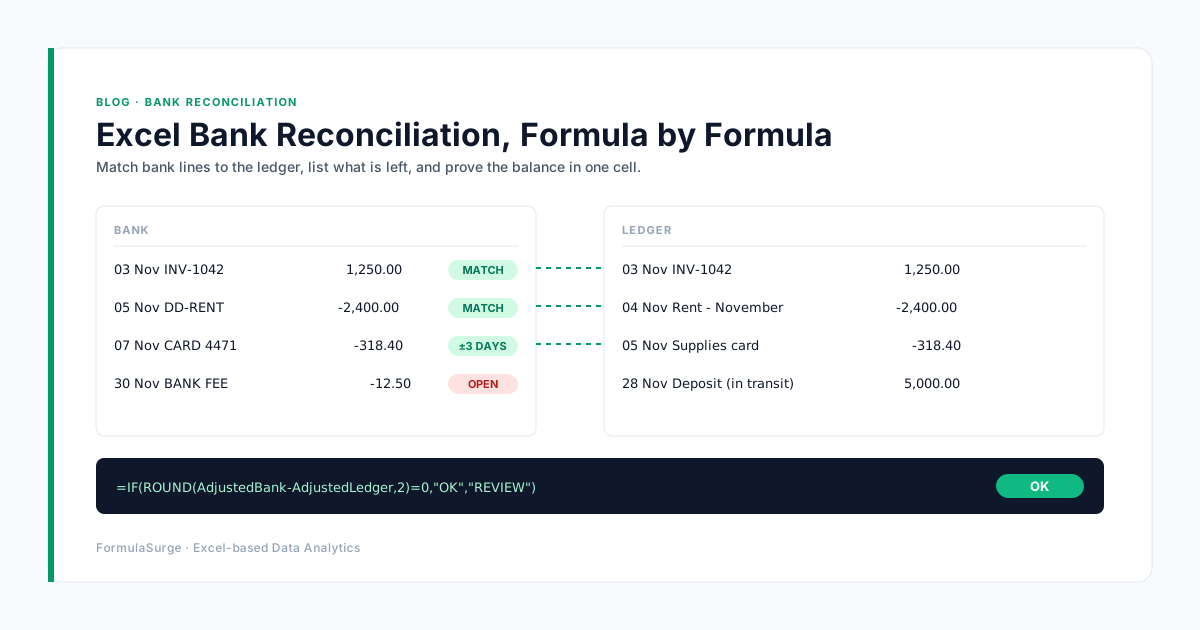
A bank reconciliation answers one question: does the money the bank says you have agree with the money your books say you have? In many firms the answer still takes a day of ticking lines on two printouts. The method below does the ticking with formulas, so the human time goes only to the lines that genuinely don't match, and next month the whole workbook refreshes with one click.

The four-tab workbook

Keep the raw exports, the matching and the proof apart. When something doesn't balance, you know which tab to open.

  • Bank

    The bank statement export, loaded by Power Query. One row per bank line: date, description, reference, amount (money in positive, money out negative).

  • Ledger

    The cash-book or bank-account ledger export from the accounting system, loaded the same way and with the same sign convention.

  • Match

    Formula columns next to each bank line: a match key, the matched ledger line, and a status. Nothing on this tab is typed by hand.

  • Checks

    The reconciliation proof: adjusted bank balance, adjusted ledger balance, and one cell that says OK or REVIEW.

One workbook, four tabs. Only the two export files change each month.

Step by step, with the formulas

The formulas below use structured references to Tables named Bank and Ledger.

1. Load the bank and ledger exports with Power Query

Use Data > Get Data > From File for each CSV. Set column types (Date, Decimal), make money out negative on both sides, and load each as a Table named Bank and Ledger. Next month, drop in the new files and press Refresh All.

2. Build a match key on both tables

Add a key column that joins the amount (rounded to 2 decimals) and the payment reference, so the same payment looks identical on both sides. Add the same column to both tables:

=TEXT([@Amount],"0.00")&"|"&TRIM([@Reference])

3. Match exact pairs with XLOOKUP

For each bank line, look the key up in the ledger. Lines that find a partner are matched; the rest are marked UNMATCHED.

=XLOOKUP([@Key],Ledger[Key],Ledger[TxnID],"UNMATCHED")

4. Catch duplicates before they hide an error

Count how many ledger lines share each key. A count above 1 means a double-posted entry or two identical payments, and both need a human look.

=COUNTIFS(Ledger[Key],[@Key])

5. Match the rest by amount within a date window

For lines without a reference, match on the same amount within a few days. Card payments and direct debits often clear 1 to 3 days after they are booked. This returns the first ledger line with the same amount dated within 3 days:

=IFERROR(TAKE(FILTER(Ledger[TxnID],(Ledger[Amount]=[@Amount])*(ABS(Ledger[Date]-[@Date])<=3)),1),"UNMATCHED")

Mark these as matched by amount, not matched, so a reviewer can glance over them. Two payments of the same amount in the same week can pair the wrong way round.

6. List what is left and prove the balance

Unmatched bank lines, in one spill range:

=FILTER(Bank,Bank[Status]="UNMATCHED","All bank lines matched")

Then the proof on the Checks tab:

Adjusted bank = Bank closing balance + Deposits in transit - Uncleared payments Adjusted ledger = Ledger closing balance + Unbooked interest - Unbooked bank charges Check =IF(ROUND(AdjustedBank-AdjustedLedger,2)=0,"OK","REVIEW")

If the check says OK, the reconciliation is done and the two unmatched lists are your reconciling items, ready for the file. If it says REVIEW, the difference is somewhere in those two lists.

Five reasons it won't balance

  • Timing differences

    Deposits in transit and payments not yet cleared. They are real, they belong on the reconciliation, and they should clear next month. If they don't, they're errors.

  • Bank charges and interest not booked

    The bank recorded them; the ledger didn't. They show up as unmatched bank lines with small amounts and no reference.

  • Duplicate imports

    The same statement loaded twice, or a payment entered twice in the ledger. The duplicate count in step 4 catches both.

  • Sign convention mix-ups

    Money out positive on one side and negative on the other. Every line then fails to match. Fix it once in Power Query, not by hand each month.

  • Transposed digits

    A typing error like 1,250 entered as 1,520. A classic tell: when the whole difference divides exactly by 9, look for two swapped digits.

Work down this list before you start re-ticking lines.

When to stop doing it by hand

If your team reconciles several bank accounts or several clients every month, the setup above pays for itself quickly: the formulas are written once and the monthly work becomes refresh, review the short unmatched lists, sign off. The parts that take real thought are the edge cases specific to your bank's export format and your ledger, which is exactly what a fixed-price build should settle in writing before any work starts.

Keep reading: Excel Month-End Close: How Indian SMEs Do It Faster.
FS

Written by

Independent Excel practice · 10+ years of hands-on Excel work

Excel specialists in Power Query, Power Pivot, VBA and financial modeling. The patterns on this page are the same patterns we build with - fixed scope, fixed price, named owner. About FormulaSurge. Stuck on a formula? Get a free fix.

Free tool · 1 min · runs in your browser

VLOOKUP to XLOOKUP Converter

Convert a fragile VLOOKUP into a safer XLOOKUP that survives inserted columns.

Open the tool

Related service

Need this built for your team?

See Excel Automation - fixed price in writing, built end-to-end. Not sure of the scope? A Scoping Sprint ($99 / ₹4,999) gives you an exact quote first.

Read more

Start here · Scoping Sprint

Know the exact price in 2 working days. $99, credited in full to your build.

Builds from $75, fixed in writing · Working draft in 5 days or your first payment back · Mutual NDA first if you want one

10+ years in ExcelNamed senior ownerFixed price, in writingDraft in 5 days or refundMutual NDA on request30-day warranty

Frequently asked

Questions readers ask most.

How do I do a bank reconciliation in Excel?

Load the bank statement and the ledger into two Excel Tables (Power Query makes this repeatable), build a match key from amount and reference, match the pairs with XLOOKUP, list the unmatched lines with FILTER, and prove that the adjusted bank balance equals the adjusted ledger balance in one check cell.

Which Excel formula matches bank transactions to the ledger?

XLOOKUP on a match key (amount plus reference) handles exact pairs. For lines without a reference, FILTER on the same amount within a date window, wrapped in TAKE to return the first match, handles card payments and direct debits that clear a few days later. COUNTIFS on the key flags duplicates.

Why does my bank reconciliation not balance?

Usually one of five reasons: timing differences (deposits in transit, uncleared payments), bank charges or interest not booked in the ledger, duplicate imports, a sign-convention mismatch between the two exports, or a typing error. If the difference divides exactly by 9, check for two swapped digits.

Do I need Microsoft 365 for this method?

XLOOKUP and FILTER need Excel 2021 or Microsoft 365, and TAKE needs Microsoft 365. On older versions, INDEX/MATCH replaces XLOOKUP and a helper column with COUNTIFS replaces FILTER. Power Query is built into Excel 2016 and later.

Should an accounting firm reconcile in Excel or in the accounting software?

If the accounting software's bank feed matches most lines automatically, use it. Excel earns its place when the feed is missing or unreliable, when one workbook reconciles several accounts or clients, or when a reviewer wants the matching logic visible. A refreshable Excel workbook covers those cases without new software.

Start with a Scoping Sprint

Want this built for your team?

Send your requirements, a sample workbook or a screenshot. We reply within one working day, and the Scoping Sprint ($99 / ₹4,999) gives you the exact price in 2 working days, credited in full to the build.

  • Written scope and fixed price before any build work starts
  • Working draft in 5 working days or your first payment back
  • Recorded walkthrough and 30-day warranty at handover
  • Mutual NDA on request
Replies within one working day, usually the same day

Calls 9am–7pm IST, Mon–Sat · How a project works

Built for teams in

Industries and cities this work is set up for

Reading norms

How every article on this blog is written.

Same six rules on every post - from the first 10-functions article to the latest CFO report pattern. The writing matches the work.

Excel workbook with a sales table and a rising chart15% OFF

Welcome offer

15% off your first project

15% off the build fee of your first project. Mention it when you book; the Scoping Sprint is still credited in full.

Start with the $99 Scoping Sprint: a fixed price for your build in 2 working days.

Not ready yet? · Free

Free 10-minute Excel audit

Seven checks on your workbook, results in writing within one working day.